Appish Html Theme
Welcome to Appish PWA Html App!
- Appish App is a Progressive Web Application (PWA).
- We are pleased that you have chosen Appish PWA App for your site and we will not disappoint you with your choice. Appish is an excellent theme develop with a concise approach. The code written is a clean and well structured.
- PWA is a website which looks and feels same like Android or iOS Application but it's website only. As this is a website, the user can not download the app from the play store, App store or any store.
- When Customers visits your website, it shows a pop-up "Add to HomeScreen". Click on that button which shows you an option of install app.
- So, this is Html website which is not based on adroid or iOS.
- Appish App has more than 80+ html pages which include Dark & RTL Version too.
- We request to have a look at our Appish document to know brief about the theme! We have compromised each and every detail for you in this manual that you will need.
- If we are unable to answer your queries beyond our documentation, you are free to contact us through the themeforest support page with your site. We will be happy to cater you and will get back to you in no time.
folder structure
When you unpack downloaded archive from ThemeForest.net you'll get folder containing 2 folders.
- Documentation - Documentation for Appish PWA HTML App template
- THEME - Appish Main Folder
- Theme
- all html files
- assets
- css
- all css files
- fonts
- all fonts files
- images
- all images
- js
- all js files
- scss
- base
- _reset.scss
- _typography.scss
- components
- _accordion.scss
- _action.scss
- _animation.scss
- _breadcumb.scss
- _button.scss
- _countdown.scss
- _form.scss
- _general.scss
- _modal.scss
- _nav-tabs.scss
- _notification.scss
- _pagination.scss
- _pricing-card.scss
- _product-card.scss
- _progress.scss
- _ratio.scss
- _slider.scss
- _switch.scss
- _table.scss
- _toast.scss
- layout
- _footer.scss
- _header.scss
- _sidebar.scss
- pages
- _authentic.scss
- _blog-page.scss
- _ecommerce.scss
- _element-page.scss
- _general-page.scss
- _grocery-page.scss
- _page-catagories.scss
- _page-list.scss
- _startup.scss
- themes
- _dark.scss
- utils
- _classes.scss
- _mixin.scss
- _variables.scss
- vendors
- bootstrap
- all bootstrap scss files
- bootstrap.scss
- slick.scss
- slick-theme.scss
- bootstrap
- base
- svg
- all svg files
- video
- all video files
- dark.scss
- style.scss
- css
Gulp
Installing Node.js
First, you must download and install node.js. NPM stands for node packaged modules and is a way to manage development dependencies through Node.js.
Download the Node.js source code or a pre-built installer for your platform, and start developing, you can download it from nodejs.org
You can check it in your terminal window using these commands node --version and
npm --version.
Installing Gulp
GulpJS is a toolkit for automating painful or time-consuming tasks in your development workflow, so you can stop messing around and build something.
-
Navigate to the root main/directory,default
-
Then use
$ npm icommand (install node js) -
$ gulpcommand (for run project)
NPM use the package.json file and automatically install the required local dependencies listed in it.
dependencies are : gulp, browser-sync, gulp-autoprefixer, gulp-livereload, gulp-pug, gulp-sass, livereload
We have added all necessary gulp task in gulpfile.js, for more details about plugin refer this link https://gulpjs.com/plugins/
How to set live reload path
Go to Gulpfile.js
proxy: "localhost/Your project name"
PWA Settings
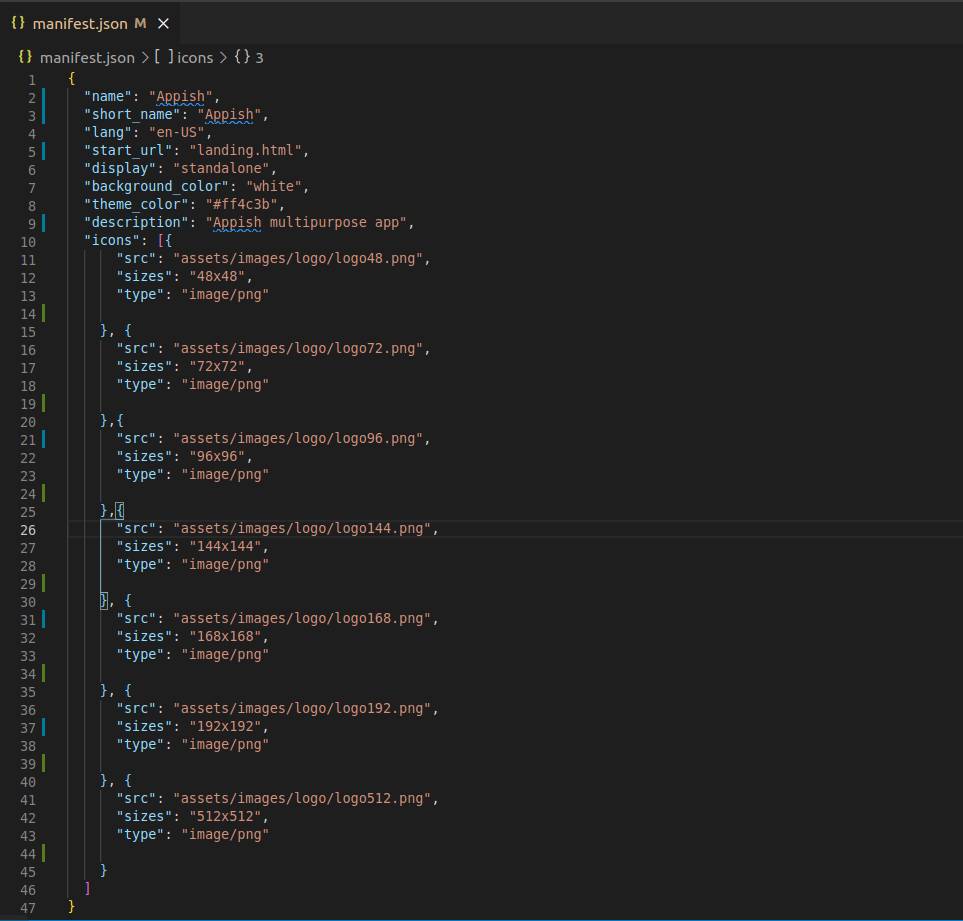
Manifest file
You will find this file in main folder where you can change the configration. It describes the name of the app, the start URL, icons, and all of the other details necessary to transform the website into an app-like format.
Secure contexts (HTTPS)
The web application must be served over a secure network. Being a secure site is not only a best practice, but it also establishes your web application as a trusted site especially if users need to make secure transactions. Most of the features related to a PWA such as geolocation and even service workers are available only once the app has been loaded using HTTPS.
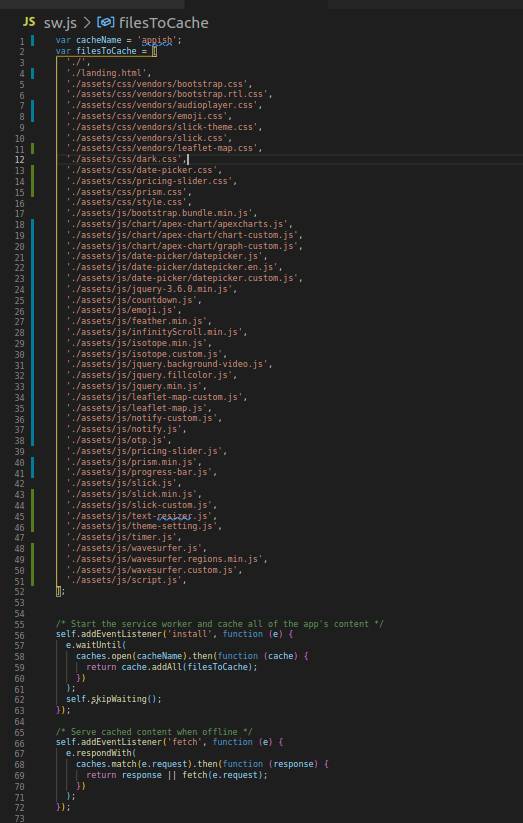
Service workers
A service worker is a script that allows intercepting and control of how a web browser handles its network requests and asset caching. Here you can attached the css and js files.
fonts
In Appish theme, google fonts have been used. google fonts are open source and easy to use. Appish have used following fonts:
- Nunito Sans, sans-serif
you can use different google fonts. following are the steps
- Go to Google Fonts.
- Use the filters on the left-hand side to display the kinds of fonts you want to choose and choose a couple of fonts you like.
- To select a font family, press the ⊕ button alongside it.
- When you've chosen the font families, press the [Number] Families Selected bar at the bottom of the page.
- In the resulting screen, you first need to copy the line of HTML code shown and paste it into the head of your HTML file. Put it above the existing element, so that the font is imported before you try to use it in your CSS
- You then need to copy the CSS declarations listed into your CSS as appropriate, to apply the custom fonts to your HTML.
Icons
Appish have mainly used Feather Icons. Feather icons available in https://feathericons.com/
how to use Feather font
- You can place Feather icons just about anywhere using a data-feater="" attribute and the icon’s name.
- To reference an icon, you need to know two bits of information. 1) Add feather.js file in your document and 2) Give icon name in data-fetaher="" attribute
For Example:
                        <i data-feather="heart"></i>
                        <i data-feather="home"></i>
                        <i data-feather="moon"></i>
                        <!-- feather icon js -->
<script src="assets/js/feather.min.js" ></script>
RTL
If you want RTl theme, changes are below:
                        <!-- Replace bootstrap.css with bootstrap.rtl.css -->
<link id="rtl-link" rel="stylesheet" type="text/css" href="assets/css/vendors/bootstrap.rtl.css">
                        <!-- Add dir rtl in html tag -->
<html lang="en" dir="rtl">
Dark
If you want Dark theme, changes are below:
                        <!-- Replace style.css with dark.css -->
<link id="change-link" rel="stylesheet" type="text/css" href="assets/css/dark.css">
                        <!-- Add add class dark in html tag -->
<body class="dark">
auto height adjustment
Ratio Classes: Change your image proportion by just adding class
If you use image as background than add class ".bg-img" in image and add below class in parent.
- .ratio_40 - 40%
- .ratio_45 - 45%
- .ratio2_1 - 50%
- .ratio2_3 - 60%
- .ratio3_2 - 66.66%
- .ratio_landscape - 75%
- .ratio_square - 100%
- .ratio_asos - 127.77%
- .ratio_portrait - 150%
- .ratio1_2 - 200%
credits
without this plugins and products, our theme will be incomplete.
open source plugins
- Animations: https://daneden.github.io/animate.css/
- Bootstrap: https://getbootstrap.com/
- Slick Slider: https://kenwheeler.github.io/slick/
- Feather Icon: https://feathericons.com/
- Date Picker: https://www.jqueryscript.net/time-clock/Date-Time-Picker-Bootstrap-4.html
- Apexcharts: https://apexcharts.com/
- Notify: https://notifyjs.jpillora.com/